
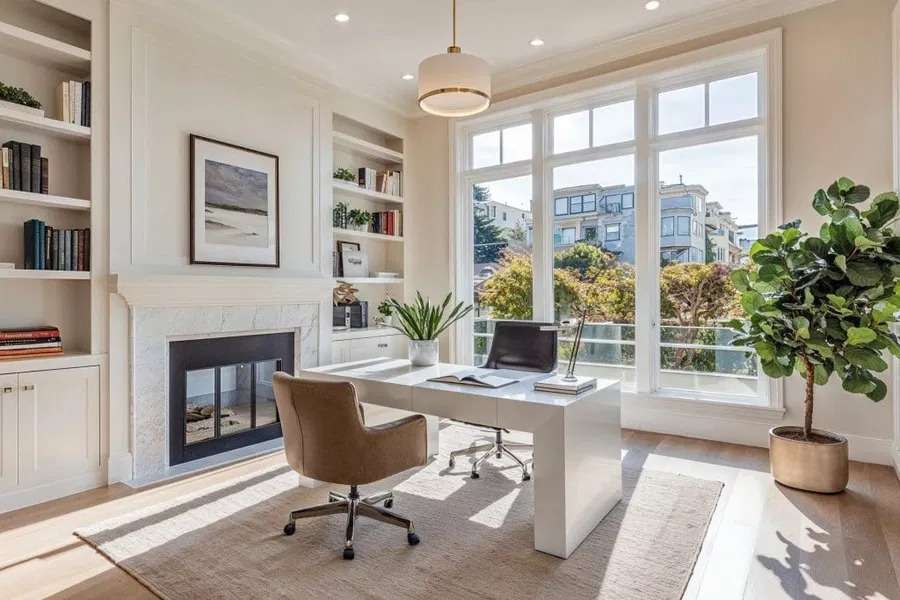
So you’re setting up a home office in 2026. Or maybe you’re redoing the one you rushed into back when we all thought working from home was temporary. Yeah, that didn’t age well, did it?
Here’s what I’ve noticed after years of writing about celebrity homes and interior spaces.
People spend thousands on kitchens they barely cook in, but their home office? That’s where they spend 40+ hours a week sitting in a dining chair that’s slowly destroying their back.
I’m not here to tell you to buy the most expensive Herman Miller chair or install smart everything.
What I am here to do is help you create a space that actually works for how you live and work. Not some Instagram-worthy setup that looks pretty but functions terribly.
Stay with me. We’re going to walk through what actually matters in 2026, and I promise I’ll tell you where you can save money and where you absolutely shouldn’t.
How To Create Perfect Home Office In 2026
Choosing the Right Space for Your Home Office
This is where most people get it wrong right out of the gate.
You know what I see all the time? Someone picks the smallest bedroom in the house because, well, it’s just an office, right? Wrong.
The size matters less than the location and what’s around it.
If your “office” is next to the kitchen where everyone congregates all day, you’re going to hate your work life.
I learned this the hard way in my first renovation project. Beautiful space, terrible location. Could hear every conversation, every dish clanking, every snack bag opening.
Here’s what to look for instead. Natural light. That’s number one.
A window you can actually see out of, not one that faces a brick wall three feet away. Your brain needs that connection to outside, to weather, to time passing.
Privacy comes next. And I don’t just mean a door.
I mean actual separation from the household chaos.
A basement office can work if you solve the lighting problem. An attic space? Sure, if you handle the temperature extremes.
The corner of your bedroom is not an office.
I don’t care how many TikTok videos show you cute desk setups in bedrooms.
Your brain needs to separate work space from sleep space, and when they’re the same room, neither works properly.
One client I worked with converted a dining room they never used. Best decision they made. Ground floor, windows on two sides, door that closes. That’s what you’re looking for.
Ergonomic Essentials for Long-Term Comfort
Okay, this is where I’m going to sound like your mom for a second, but your 40-year-old back is going to thank your 30-year-old self for paying attention here.
The chair matters more than anything else in this room.
More than your desk, more than your monitor, more than that fidget spinner you definitely don’t need.
But here’s the thing nobody tells you.
The most expensive chair isn’t always the right chair for your body.
I’ve seen people drop $1,500 on a chair their friend recommended only to discover it doesn’t fit their height, their sitting style, or their desk setup.
Go try chairs in person. Sit in them for 20 minutes, not 20 seconds.
Your local office furniture store will let you do this.
Bring your laptop if they’ll let you. Actually, I’d say that’s required if you want to get this right.
Your desk height needs to match your chair height and your body proportions.
Standard desk height is 29-30 inches, but if you’re 5’2″ or 6’4″, that standard doesn’t work.
Standing desks sound great until you realize you also need an anti-fatigue mat and you’ll actually only use the standing position 20% of the time.
Monitor position? Top of the screen should be at or slightly below eye level.
Not on your laptop screen unless you enjoy neck pain. Get a separate monitor, raise it up properly. This isn’t optional.
Keyboard and mouse positioning gets ignored all the time.
Your elbows should be at 90 degrees, wrists straight, not bent up or down. That weird numbness in your fingers? Yeah, that’s from ignoring this for three years.
Technology and Smart Office Upgrades for 2026
Let’s talk about what’s actually useful versus what’s just expensive and complicated.
Good internet is non-negotiable. If your WiFi signal is weak in your office space, run an ethernet cable or get a mesh system.
Those video calls where you freeze mid-sentence? That’s not charming, that’s costing you credibility.
But here’s where 2026 gets interesting.
A solar inverter for sale, paired with solar panels, converts sunlight into power for your office.
I’m seeing more people do this, especially if your office is in a separate structure or if you’re in an area with unreliable power.
The upfront cost makes sense when you calculate what you’d lose during a power outage in the middle of a deadline.
Smart lighting sounds gimmicky until you actually use it properly.
Being able to adjust your light temperature throughout the day, going cooler and brighter in the morning, warmer in the afternoon? Your circadian rhythm will actually thank you. But you don’t need to make your pencil holder smart. Some things can just be things.
Noise-canceling headphones matter more than speakers.
Your household doesn’t need to hear your Zoom calls, and you don’t need to hear their TikTok videos.
A good webcam and microphone make you look professional.
Your laptop’s built-in camera makes you look like you’re calling from 2015. The difference is maybe $150. Worth it? Yes.
Lighting Strategies for Productivity and Focus
I’ve been talking about lighting in homes for over a decade, and this is where people make the most mistakes without even realizing it.
That overhead light fixture? You probably need it less than you think.
What you actually need is layered lighting that you can control based on time of day and task.
Natural light is still your best friend.
Position your desk perpendicular to the window, not facing it or with your back to it. Facing it creates glare on your screen.
Back to it creates a shadow on your workspace and makes you look like a silhouette on video calls.
Task lighting for your desk should come from the side, not from behind your monitor.
A good desk lamp with adjustable brightness and color temperature will change how you feel at 4 PM when that afternoon slump hits.
Ambient lighting fills in the shadows.
This is where people either go overboard with those LED strips everywhere or they completely skip it.
You want enough light that your eyes aren’t straining to see the room, but not so much that it feels like an interrogation room.
One trick I learned from commercial office designers? Have different lighting scenes saved for different tasks.
Detailed work needs brighter, cooler light. Video calls need softer, warmer light that’s more flattering. End of day admin work can be dimmer, more relaxed.
And please, please change your light bulbs when they start flickering.
That subliminal strobe effect is giving you headaches even if you don’t consciously notice it.
Storage and Organization Solutions
Here’s what happens.
You set up your office, it looks great for two weeks, and then papers start piling up, cables multiply like rabbits, and suddenly you can’t find anything.
I’m not naturally organized.
I’ve had to learn these systems because I work with people who have to see everything or they forget it exists. That’s most of us, by the way.
Closed storage for things you don’t need daily.
Open storage for things you grab constantly. This seems obvious but watch how many people do the opposite.
Filing systems need to match how your brain works. If you’re not going to maintain an alphabetical filing system, don’t set one up.
Chronological might work better for you. Or by project. Or by color if that’s genuinely how you remember things.
Cable management isn’t just aesthetic.
Tangled cables collect dust, create fire hazards, and make it impossible to troubleshoot when something stops working.
Velcro ties, cable clips, a power strip mounted under your desk. One afternoon of setup saves you hours of frustration.
A Murphy chest bed queen elegantly transforms your office into a guest room.
This solves the problem so many people have where they need their space to do double duty. During work hours, it’s your office.
When family visits, it’s a bedroom. The chest part gives you storage that stays accessible either way.
Vertical storage beats horizontal storage almost every time.
Wall-mounted shelves, pegboards, even magnetic strips for small metal items.
Your desk surface should be mostly clear, not covered in organizers that are somehow always full and never useful.
Home Office Aesthetics and Personalization
This is where you get to actually enjoy your space instead of just tolerating it.
But first, let me tell you what doesn’t work.
Treating your office like it’s a different house from the rest of your home.
If your whole house is warm wood tones and soft colors, your office shouldn’t suddenly be industrial concrete and steel. That’s jarring every time you walk in.
Your office should feel like the most focused, calm version of your home’s style. Not a departure from it, an extension of it.
Color on the walls. Yes. Please. White walls might photograph well but they’re sterile and cold for a space you’re in all day.
Pale neutrals with some warmth, soft greens, muted blues. These actually help you concentrate better than stark white or bold accent walls.
Personal items matter more than you think.
Photos, art, things that remind you why you’re working. But not so many that your background on video calls looks chaotic.
Plants are having their moment and will continue to have it because they actually work.
They improve air quality marginally, sure, but more importantly they give your eyes something living to rest on.
Snake plants and pothos are hard to kill. Start there.
Your office doesn’t need to look like a tech startup or a law firm unless you work at one.
It needs to look like your space. A space you want to be in.
Soundproofing and Acoustics
If you’re in a lot of video calls or if you need concentration for deep work, this matters more than you realize.
Full soundproofing is expensive and probably overkill. But sound dampening? That you can do affordably.
Rugs help more than you’d think. Hard floors bounce sound around.
A rug absorbs some of that. Heavy curtains do the same thing.
Upholstered furniture, that chair you already bought for ergonomics, that’s helping with sound too.
The echo in your room during calls? That’s because you have too many hard surfaces.
Add some soft materials. Doesn’t have to be fancy acoustic panels, though those work great if you want them.
Door sweeps block sound from coming in under the door.
If you have hollow core doors, they’re basically paper for sound.
Solid core doors or even hanging a heavy blanket makes a difference.
Background noise machines can help mask household sounds you can’t control. Just not during video calls, that’s weird.
Energy Efficiency and Sustainability
This section would’ve been an afterthought five years ago. In 2026, it’s actually affecting people’s decisions.
LED bulbs everywhere. This shouldn’t still need to be said but I still see people using incandescent bulbs. You’re wasting money every month.
Power strips that actually turn off. Most electronics draw power even when “off.”
A smart power strip or just remembering to switch it off at the end of the day adds up over a year.
Temperature control for just your office rather than heating or cooling your whole house saves more than you’d expect.
A good space heater or fan, used strategically, costs less than adjusting your whole home thermostat.
Sustainable materials when you’re buying furniture.
Solid wood lasts longer than particle board. Buy once, buy right. That cheap desk from the flat-pack store will be in a landfill in three years.
Natural ventilation when possible.
Opening a window does more for your air quality and alertness than any air purifier, and it’s free.
Budget-Friendly Home Office Setup Tips
Not everyone has $5,000 to drop on an office setup. Most people don’t.
Here’s where to spend and where to save.
Spend on your chair, your main light source, and your internet connection. Everything else has budget options that work fine.
Used office furniture is everywhere right now.
Companies downsized, people moved, changed setups.
Marketplace, Craigslist, office liquidation sales. A $1,200 chair for $300 because someone needs it gone? Yes.
DIY desk options are better than they used to be.
A solid door or butcher block on adjustable legs works perfectly and costs a fraction of a branded desk. I’ve seen these setups outlast expensive desks.
Paint changes everything and costs almost nothing.
You can handle walls yourself. Maybe not the whole house, but one room? You’ve got this.
Shop your house first. That bookshelf in the guest room nobody uses, the lamp in the basement, the chair from your old apartment. Repurpose before you buy new.
Wait for sales on technology.
Black Friday, Prime Day, back to school sales. Monitors and accessories go on sale predictably. Plan ahead, save the difference.
Free software often works as well as paid options.
You don’t need the premium version of everything. Start free, upgrade only if you actually need the features.
Conclusion
Look, your home office doesn’t need to be perfect. It needs to work for you, right now, with room to adjust as your needs change.
I’ve been writing about interior spaces long enough to know that the best room is the one you actually use and feel good in. Not the one that looks best in photos.
Start with the basics. Good chair, good light, good location.
Everything else you can figure out as you go. And you will figure it out, because you’ll be spending enough time in there to notice what’s missing.
The home office setups that last are the ones that evolved over time, not the ones someone installed in a weekend and declared done.
Your space should grow with you.
Now go take a look at your current setup with fresh eyes.
What’s the one thing that’s been bothering you? Start there. Fix that. Then move to the next thing.